Over the years, I’ve had lots of practice teaching both elementary and middle school students, having taught every level K-8, except 5th grade! When I moved into teaching third grade, it became clear to me there was a lot more testing than I was accustomed to, including Dibels, NWEA, M-Step and more. So much testing that students were becoming very. . . what’s the word?
Lackadaisical? Disconnected? Complacent?
They just weren’t really giving their best efforts and that made it hard to use the data we received from the tests. Students were lacking grit and an “I can” attitude when things got tough. They had no goals or desires to improve their test scores. After discussing this issue with my team, we came to the conclusion that our students really needed two things:
-
A change in their mindset, and
-
A connection to the results of their tests.
To combat this problem, we’ve started introducing students to growth mindsets and goal setting. Students caught on pretty quickly to the concept of having a growth mindset. They needed some practice and support along the way, of course, but it was a great natural fit for third graders.
Goal setting was another story.
Young students often have a hard time thinking about actions, consequences, and, generally, anything that takes place in the future, so setting goals is not an easy task for them. We decided that the best steps for moving forward included:
- Providing practice tests that could give students immediate feedback
- Using topics on which students might have an easier time reaching their goals
- Giving students a visual aid, such as a graph
- Involve their supports at home (i.e., mom, dad, etc.)
We started with one-minute multiplication tests that students take once a month.
They would take the test, grade it, and graph their results all in the same day.
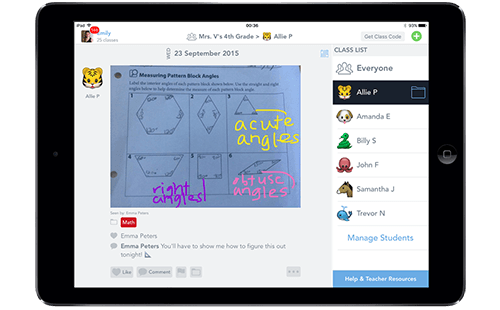
In order to have students share their goal and results with their family, we chose to use our iPads and an app called SeeSaw. On SeeSaw, students post a picture of their graphed results with a comment articulating their next goal.
Then, their families (or whomever is linked to their account) could see and comment on their post. The most effective part of having students share with parents and peers was the feedback they received.
Students — no matter what their results are — beam with pride when parents give feedback in the form of “likes” or comments such as:
- “Great job! I knew you could do it!”
- “You’ll get it next time!”, or
- “We can work on this together.”
Recently, we decided to take our goal setting to the next level.
After a few months of goal setting, we started to talk with students about what they could do to meet their goals. This led to some deep discussions (at least as deep as 3rd graders can get!) on their role as learners. We talked about how if you want to change your results, you must first change your actions.
Things got real, y’all.
Students began using these discussion points in their comments. They not only set new goals, but they also discussed how they were going to meet their goals, including what actions were they going to take.
This really sparked parents to jump in to help their students. Parents and students now had more of a connection to tests because they had goals and strategies for meeting their goals. They made their own personal standards for success and gained agency over their own learning.
The final step in our goal-setting process was reflecting on our previous month’s goal and why we did or did not make our goals.
Admitting that you failed or didn’t do as well as you wanted to do is hard for anyone. To soften the blow a bit, we had students leave supportive comments for their peers.
Here is the best part:
They were so sweet and supportive of each other! I almost feel like students gained more from the peer support than they did from their teachers and family.
Now, my students are analyzing their scores and setting growth goals. They have the motivation to do well because of what they want to achieve. Not only are we seeing growth in the classroom, but we have also been getting feedback from parents on how their children are making connections to their learning at home.
They are owning their learning. And that is a beautiful thing.