Using Piktochart in the Classroom

Facebook
LinkedIn
X/Twitter

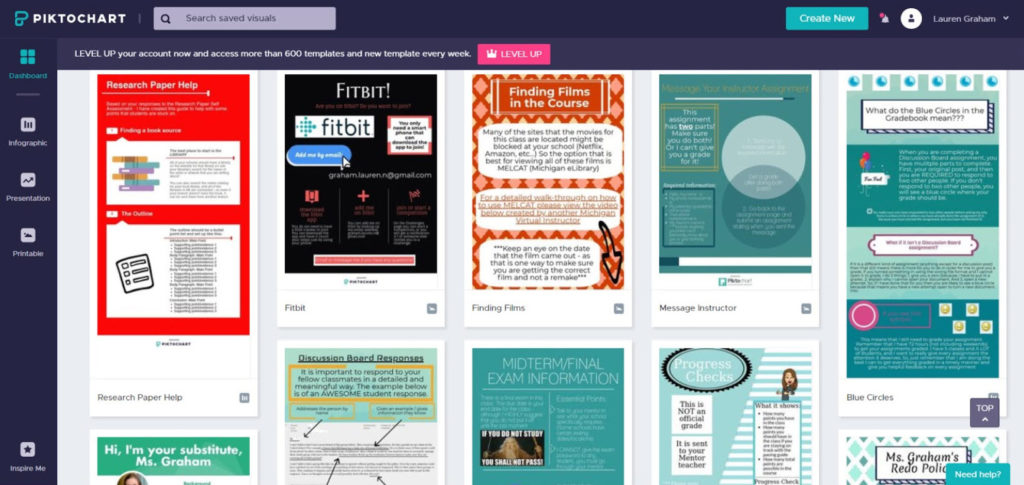
Some of my students were struggling with specific aspects of taking a course online, as well as certain assignments. They would send me emails that were along the lines of “I need help with the test I’m on right now,” to which I would have to reply, “Which test are you on? What are you having trouble with?” I wanted to cut out this part of the conversation and get right to helping them. So I decided to create a Piktochart that explained where they can look for FAQs and what they should include in a message when they reach out for help.

I also use Piktochart to share and examine examples of some assignments. Students in my classes were struggling with responding to each other over the online discussion board in meaningful ways. So I took a screenshot of a very well written response from a student and I used Piktochart to point out specific things that I wanted students to include in their responses. Students see this infographic every time that they open the Discussion Board page and since posting it I have seen a large increase in the quality of responses students write to each other. This tool would also be great for going over general assignment format, rubrics, citation formats, and much more.

Overall Piktochart has helped me create a way to share important information with my students in a way that they will interact positively with. I found that when I posted information in plain text my students would not read it. Piktochart allowed me to emphasize important information and create eye-catching announcements that students will actually read. Students have such a short attention span when it comes to reading that there is actually an acronym for it: tldr. This stands for “too long, didn’t read.” I create my infographics with this in mind, to ensure that my students are getting the important information they need to be successful in class.

With the help of Piktochart, my students are now clear on what I expect from them and they can focus on content rather than time-consuming class procedures. I have seen a diminished amount of simple questions that take the focus off the class material. I am so glad that I found this tool and I think that it would be beneficial for both online and face-to-face teachers to utilize.

Check out Piktochart!

Facebook
LinkedIn
X/Twitter
Picture of Lauren Graham

Lauren Graham

You might also like...

Top-down View of Children in Classroom Use Tablets and Laptops, Connectivity by Lines of AI Data, Information. Diverse Kids Study with Interactive E-Learning, Modern Education, Digital Literacy

Have You Considered AI in Your Classroom? A Khanmigo Pilot Story

In a two-phase pilot across Michigan schools, educators used Khanmigo, an AI-powered tutor and teaching assistant, to explore how AI might support teaching and learning. Their reflections surfaced both opportunities and challenges. The big takeaway?...
Psychological concept of choices and Finding or Choosing the right life path with group of diverse people following intersecting paths to doors with central signpost on arrow, flat vector illustration

Out of Order, Still Out of Reach: Variations in Pacing among World Language Students

Cuccolo & Green’s (2025) report highlighted the relationship between students’ assignment submission patterns and final course scores. Given that pacing has important implications for student performance, knowing what assignment submission patterns look like across schools...
Illustration of three people using virtual reality (VR) headsets. Each person is interacting with a colorful, cosmic-themed environment featuring abstract planets, stars, and orbits. One person points at a floating circle, another raises their hand toward an orange sphere, and the third holds VR controllers, immersed in the experience. The background features deep purples, blues, and greens with celestial shapes like the moon and stars.

From Curiosity to Career: Exploring Possibilities with VR

Explore how immersive VR simulations helped students step into real-world roles: from EMTs to chefs, all without leaving the classroom....
A cheerful classroom scene with elementary-aged students working on laptops. A smiling boy in the foreground looks directly at the camera, while other students and a teacher engage in learning activities in the background. The classroom is softly lit, with large windows and warm yellow curtains.

The AI Horizon: Case Studies in Michigan Education’s Transformation (Part 2)

The work to integrate artificial intelligence in Michigan schools is gaining momentum. In Part 1 of this series, we looked at how four districts are building their own foundations through task forces, learning councils, and...

A classroom scene where a diverse group of elementary-aged students work on laptops at their desks. A smiling teacher leans over to assist one student, creating an engaging and supportive learning environment. Sunlight streams through large windows with yellow curtains in the background.

The AI Horizon: Case Studies in Michigan Education’s Transformation (Part 1)

The integration of Artificial Intelligence (AI) is rapidly shifting the landscape of education, presenting both unprecedented opportunities and novel challenges for K-12 institutions. Across Michigan, a wave of innovation is taking shape as K-12 schools,...

Two coworkers discussing work over lunch outside their office building while on a break

Mastering Change: Coaching as the Lever for Transformation in Education

Originally published in the Spring 2025 issue of the MASB Leaderboard Magazine. Introduction A few years ago, I came across Master of Change by Brad Stulberg, and it couldn’t have landed at a more fitting...

The Digital Backpack

Get our latest articles sent straight to your inbox every week!